Help
The following are very common new user errors. More can be found on the Data Science for Environmental Health Error FAQ page.
RTools
Many core Tidyverse packages (such as dplyr and readr) outsource computationally and memory-intensive tasks to C++. This makes things faster but unfortunately, requires some additional software. This is where Rtools comes in. Not all packages need it; just the ones that use C, C++ or Fortran code.
If you get an error like this, it means you still need to install it.
*WARNING: Rtools is required to build R packages but is not currently installed.
Please download and install the appropriate version of Rtools before proceeding:
https://cran.rstudio.com/bin/windows/Rtools/- Download the Rtools45 installer
- Find the file that just downloaded
- Double click to start installation
- Close and reopen RStudio
Note
If running an older version of R, you might need to choose from the different versions of Rtools.
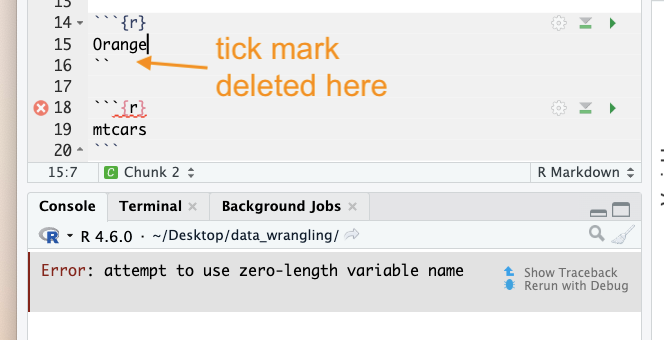
Error: attempt to use zero-length variable name
Usually, this means that a code chunk inside an .Rmd file was messed up. Example with a tick mark deleted:
Issues reading/finding data
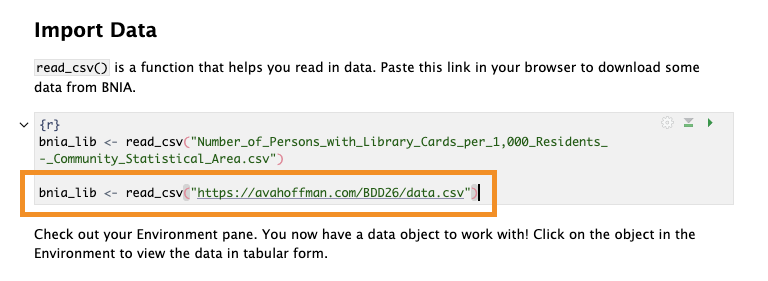
If you are really struggling to find data on your machine, or are not able to set up an R Project correctly, you can alternatively read data in directly from my website using a url:
bnia_lib <- read_csv("https://avahoffman.com/BDD26/data.csv")